
How to Reply to Every Inbound Lead in Under 5 Minutes with Zoho Bigin Free
Time to build
2 hours
Setup cost
$0
Read time
8 min read
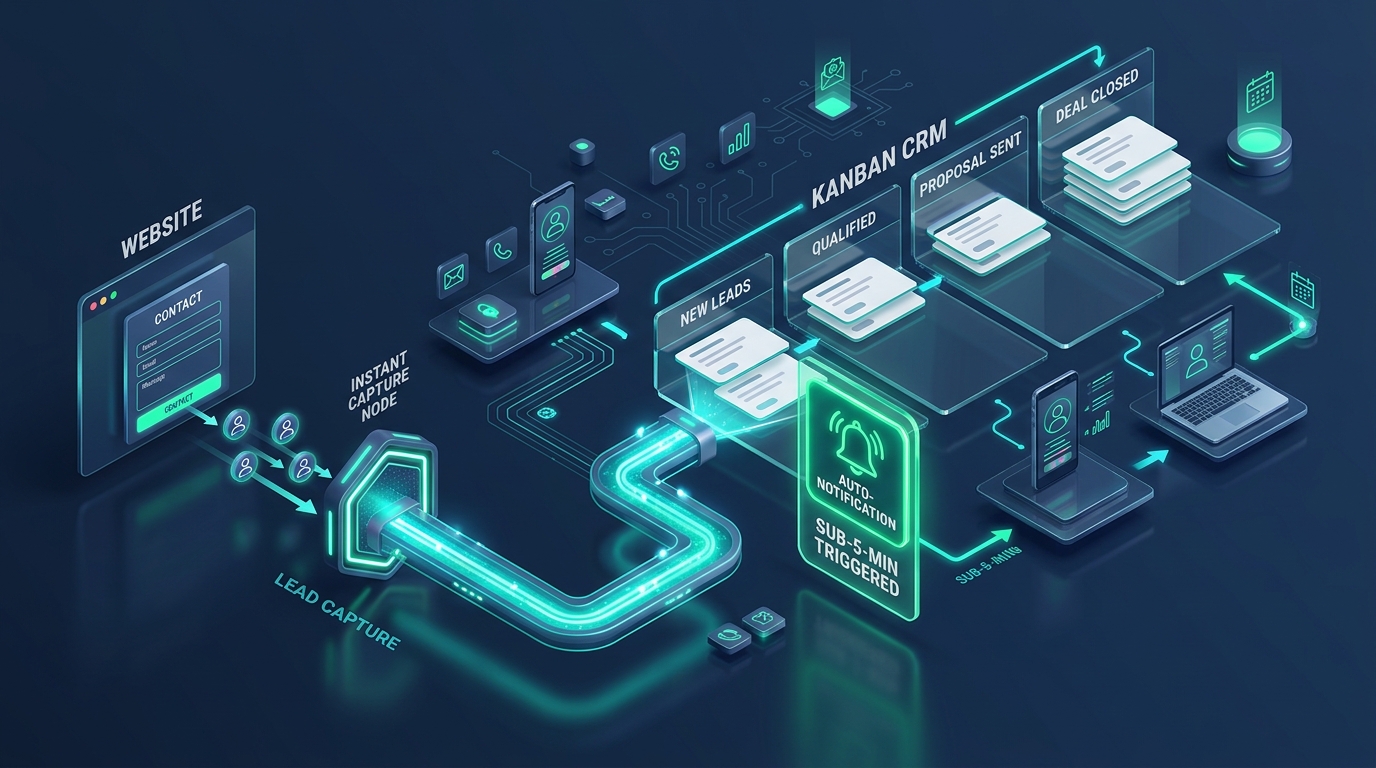
Lead Capture & CRM Routing Flow
Instant form intake, automated CRM qualification pipeline, and sub-5-minute alert triggers
The Blueprint Summary
You do not need expensive software to respond to sales inquiries in minutes. Zoho Bigin Free gives you 1 web form, 1 pipeline, and 3 automation rules. By linking them together, you can send an instant confirmation email, get a mobile push alert on your phone, and create a 60-minute call task the second a prospect submits your form.
Key Takeaways
- ✓ A Harvard Business Review study shows reaching leads within an hour makes you nearly 7 times more likely to qualify them than waiting longer.
- ✓ Bigin Free includes 3 workflow automation rules, exactly enough to build an instant auto-reply, a mobile alert, and a 60-minute task.
- ✓ An instant confirmation email buys you crucial time by explaining your exact next steps and providing a direct phone number.
- ✓ Installing the Bigin mobile app ensures you see lead notifications immediately even when working away from your desk.
- ✓ This entire setup costs zero dollars and takes less than three hours to configure.
Before You Start
- → Create a free Zoho Bigin account
- → Have access to edit your website contact page
- → Install the Zoho Bigin app on your smartphone
Implementation Steps
Build your simple Inbound Leads pipeline
Set up a dedicated pipeline in Bigin Free with stages that match your real qualification process: New Lead, Contacted, Discovery Call, Proposal Sent, Won, and Lost.
- • Log in to your Zoho Bigin account and navigate to Settings > Pipelines
- • Rename the default pipeline to Inbound Leads
- • Configure 6 clear stages: New Lead, Contacted, Discovery Call, Proposal Sent, Won, and Lost
- • Add mandatory contact fields: Full Name, Email, Phone Number, and Service Needed
Free ($0/mo)
The Catch
Bigin Free allows only 1 pipeline, so keep your stages clean and focused on lead qualification rather than delivery work.
Create and embed the native Bigin web form
Build a clean, branded intake form inside Bigin and embed it directly onto your website contact page.
- • Navigate to Settings > Forms and click Create Form
- • Include 4 essential fields: Name, Work Email, Phone Number, and Project Notes
- • Enable Google reCAPTCHA or honeypot protection to prevent automated bot spam
- • Copy the iframe or HTML embed code and place it on your website contact page
Free ($0/mo)
The Catch
Keep form fields to a minimum. Asking for too much information upfront reduces form completion rates significantly.
Configure Automation Rule 1: Instant confirmation email
Set up an automated workflow rule that fires immediately upon form submission, delivering a professional confirmation to the prospect in under 60 seconds.
- • Navigate to Settings > Workflows and create a rule on the Deals or Contacts module
- • Set the trigger: On Record Creation when Lead Source is Web Form
- • Draft a clear email template thanking the prospect and stating: We review your project notes and call you within 1 business hour
- • Include your direct business phone number if their project is urgent
Free ($0/mo)
The Catch
Avoid sending a cold no-reply message. Make sure the email comes from your real address and invites the prospect to reply directly.
Configure Automation Rules 2 and 3: Phone alert and 60-minute task
Use your remaining 2 free automation rules to send a mobile push alert to your phone and auto-create a call task due within 1 hour.
- • Rule 2: Trigger an immediate mobile push notification to your phone via the Bigin app
- • Rule 3: Generate an open task titled Call and Qualify Lead with high priority
- • Set the task due date to Created Time plus 1 hour
- • Download the Bigin mobile app, log in, and enable high-priority alerts in your device settings
Free ($0/mo)
The Catch
Bigin Free does not have an automated escalation rule if you miss the task, so the mobile notification is your primary operational trigger.
Common Mistakes
Frequently Asked Questions
Can I connect WhatsApp to Bigin Free?
What happens when I hit the 500 records limit on Bigin Free?
Can I add a team member on Bigin Free?
References
- The Short Life of Online Sales Leads (2011) . Harvard Business Review
- 2025 Lead Form Response Time Study (2025) . Hennessey Digital
Email this guide to yourself
Save the link to your inbox so you can review the steps or implement the system when you're at your desk.
Check your inbox. The link is on its way.
No spam. Unsubscribe anytime.
Add us to your preferred sources to see our latest business systems, tool reviews, and RevOps guides first in your Google feed.