
Make vs Zapier: Which Is Worth It for MSMEs in 2026?
Make Core costs $10.59/mo for 10,000 operations versus Zapier Professional at $19.99/mo for 750 tasks. Zapier is faster to set up with 8,000 plus integrations. Make handles complex workflows at lower cost. Most MSMEs should start with Zapier and switch to Make when task limits force a price jump.
Time to build
1 hour
Weekly savings
1 hour/week
Setup cost
$0
Read time
9 min read

The Blueprint Summary
Zapier wins on setup speed and app library. Make wins on price and complexity. Start with Zapier if you are automating for the first time. Switch to Make when Zapier's task limit forces a price jump. This guide gives you the 7-step decision framework to make the right call for your specific business.
Pick the right tool from day one and avoid rebuilding your automation stack 6 months later when you realise you chose the wrong one.
Key Takeaways
- ✓ Make Core costs $10.59/mo for 10,000 operations, Zapier Professional costs $19.99/mo for 750 tasks
- ✓ Zapier does not count trigger checks as tasks, Make counts every module action including triggers as operations
- ✓ Zapier has 8,000 plus integrations versus Make's 3,000 plus, check both app libraries before committing
- ✓ Make can loop over arrays and apply conditional routing in a single scenario, Zapier cannot do either on its Professional plan
- ✓ Both tools offer free plans with no credit card required: test your actual workflow on both before spending anything
Before You Start
- → A list of the specific apps you need to connect (not general categories, specific tool names)
- → An estimate of how many automation runs per month you expect (count your leads, orders, or events per week and multiply by 4)
- → 15 minutes to test your most important workflow on the Zapier free plan
- → 15 minutes to test the same workflow on the Make free plan
- → A clear definition of the most complex workflow you plan to build in the next 3 months
Email this guide to yourself
Get the link in your inbox so you can implement it when you have time.
Check your inbox — the link is on its way.
No spam. Unsubscribe anytime.
The honest summary before you read anything else
Zapier is faster to set up and has more integrations.
Make is cheaper and more powerful for complex workflows.
For a first-time automation builder with fewer than 500 monthly workflow runs and simple linear workflows, Zapier is the right starting point.
For a business running 10 or more active automations, needing conditional routing, or working with limited budget in emerging markets, Make is the better value from month one.
The price difference in real terms
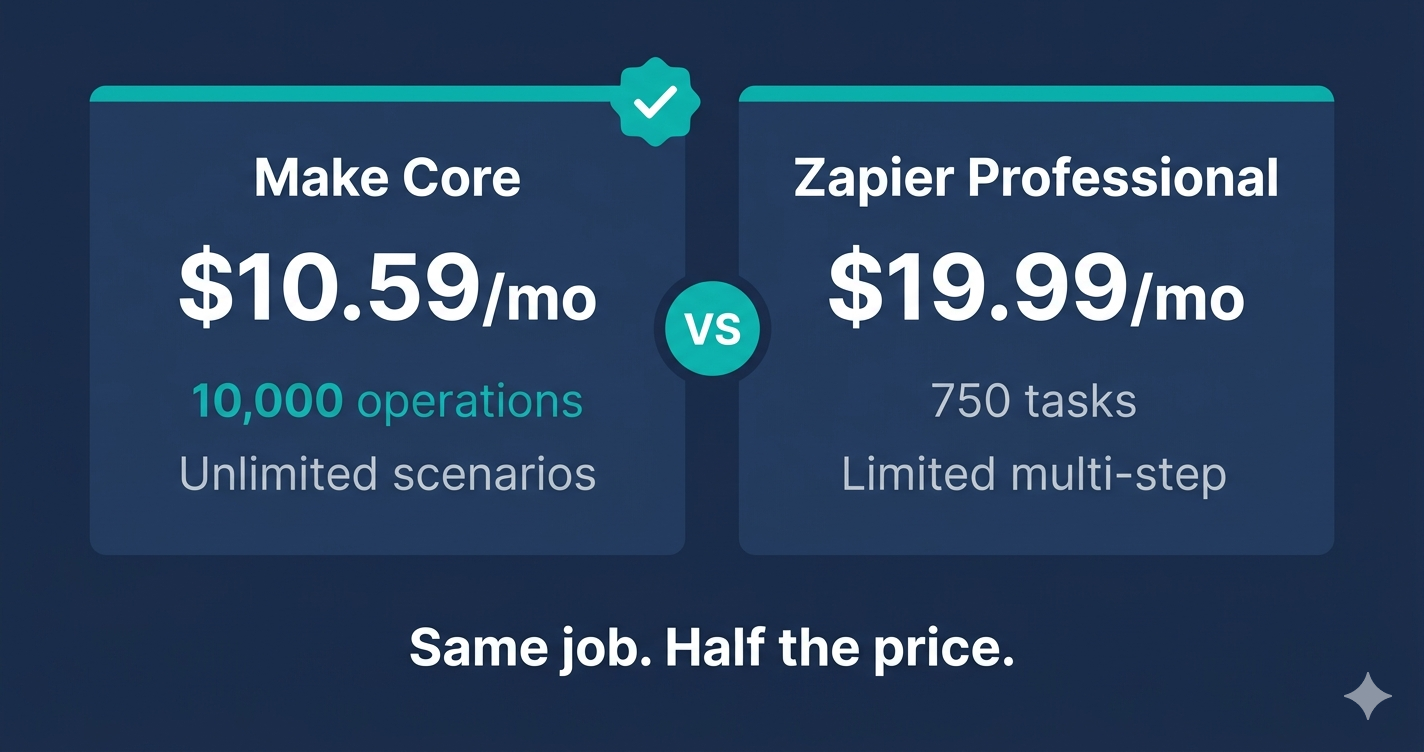
Make Core costs $10.59/mo billed annually and gives you 10,000 operations per month with unlimited active scenarios.
Zapier Professional costs $19.99/mo billed annually and gives you 750 tasks per month.
At first glance that looks like a 13x difference in monthly allowance.
The actual difference is smaller because Make counts more actions as operations than Zapier counts as tasks.
A 4-action Zapier Zap uses 4 tasks per run because Zapier does not count trigger checks.
The equivalent Make scenario uses 5 or 6 operations per run because Make counts the trigger module and any filter modules.
Even accounting for this, Make Core covers roughly 8 to 10 times more equivalent workflow runs than Zapier Professional at a lower price point.
Where Zapier genuinely wins
Zapier has 8,000 plus native app integrations versus Make's 3,000 plus.
For businesses using niche tools that postdate Make's integration library, Zapier may be the only option without resorting to webhook setup.
Zapier's step-by-step Zap builder is also significantly more intuitive for first-time users.
In testing, a non-technical user building their first automation in Zapier completes it in 20 to 30 minutes.
The same user building their first Make scenario typically takes 45 to 90 minutes before understanding the module system well enough to work confidently.
Zapier also does not count trigger polling as tasks, which means Zapier's effective monthly allowance is higher than the raw task number implies for polling-heavy workflows.
Where Make genuinely wins
Make can iterate over arrays: a single scenario run can process 50 records from one trigger event, while Zapier requires a separate run per record.
Make's Router module enables true conditional branching inside a single scenario, routing records down different processing paths based on their field values.
Make's built-in data transformation functions (formatDate, capitalize, replace, emptystring) handle field cleaning without a paid add-on.
Make's free plan includes 1,000 operations per month with access to all 3,000 plus integrations, webhooks, and the full visual builder with no credit card required.
For businesses in markets where $19.99/mo is a meaningful budget decision, Make's entry price of $10.59/mo represents a genuine and sustainable cost advantage.
The integration gap is smaller than it looks
Zapier's 8,000 plus integrations versus Make's 3,000 plus sounds decisive until you look at your actual tool stack.
Most small businesses use fewer than 15 tools.
Of those 15, the vast majority (Google Workspace, HubSpot, Mailchimp, Stripe, Facebook, Slack, Typeform, Notion, Buffer, Calendly) are on both platforms with equivalent trigger and action support.
For any tool not natively in Make's library, Make's generic webhook module connects to any modern SaaS tool that supports outgoing webhooks, which is most of them.
Check your specific tools on both app libraries before letting the headline integration count influence your decision.
The scenario where Zapier is clearly the right choice
You run fewer than 10 active automations per month.
All your automations are simple 2 to 3 step linear flows with no branching or iteration.
You need to go live in under an hour and do not have time to learn a new interface.
Several of the tools you need are only in Zapier's library and do not support outgoing webhooks.
In any of these situations, Zapier is the correct tool and the $9.40/mo price premium over Make Core is justified by the time and frustration saved.
The scenario where Make is clearly the right choice
You are running 10 or more automation runs per day and Zapier's 750 monthly task limit runs out before month end.
You need to route records based on their content, process arrays, or clean data before writing it to a destination.
Your business is in Africa or Latin America and $19.99/mo is a meaningful budget decision.
You are building a data processing workflow where one trigger event should produce multiple downstream actions depending on field values.
In any of these situations, Make is the better tool and the additional setup time is worth the long-term cost saving and capability gain.
The case for running both simultaneously
Many businesses settle on a hybrid: Zapier for simple, fast-setup workflows and Make for complex data-heavy ones.
Running both costs $10.59 plus $19.99 per month, a combined $30.58/mo, which is still less than Zapier's next pricing tier.
The practical division is: build new simple workflows in Zapier because they are faster to set up, and rebuild any Zap that hits the task limit or needs branching logic in Make.
This hybrid approach avoids the rebuild cost of migrating everything to Make at once while capturing the cost advantage for high-volume workflows immediately.
Implementation Steps
Understand how each platform counts usage
Before comparing prices, establish exactly what each platform counts as a billable unit so you are comparing the same thing.
- • Open a spreadsheet or note and write two columns: Zapier Tasks and Make Operations
- • In the Zapier column, note that triggers do not count as tasks, only action steps count
- • In the Make column, note that every module counts as one operation including the trigger module
- • Count the action steps in your most important planned workflow and multiply by your expected monthly run volume
- • Do the same count for Make including the trigger and any filter or router modules
- • Compare the monthly unit consumption for each platform against their plan limits
No cost for this comparison step. Both Zapier and Make have free plans to test with.
The Catch
Make counts filters and routers as operations. A 5-action Zapier workflow is a 6 or 7 operation Make scenario once you include the trigger and any conditional logic. The raw operation number comparison always favours Make, but the real comparison is cost per equivalent workflow run.
Check that your specific apps are supported on both platforms
Verify that every tool you need to connect is available as a native integration on the platform you are considering, because a missing integration kills the entire workflow.
- • Go to zapier.com/apps and search for each tool you need to connect
- • Note which ones are available and which trigger or action events are included on the free versus paid Zapier plans
- • Go to make.com/en/integrations and search for the same tools
- • Note which ones are available as native Make apps versus requiring a webhook connection
- • Flag any tools that appear in Zapier but not in Make, and check whether Make supports them via a generic webhook
- • If any critical tool is only in Zapier and does not support outgoing webhooks, Zapier is the correct choice regardless of price
No cost. Both app libraries are publicly searchable without creating an account.
The Catch
Zapier having 8,000 plus integrations versus Make's 3,000 plus looks significant until you check your specific tools. Most MSMEs use fewer than 15 tools. The integration gap only matters if one of your 15 tools is missing from Make and does not support webhooks.
Define the most complex workflow you plan to build
Identify your most complex planned automation and test whether it is possible in each platform, because complexity tolerance is where Make and Zapier diverge most sharply.
- • Write out your most complex planned workflow in plain language, listing each step and any conditional branches
- • Check whether any step requires iterating over an array (processing multiple records from one trigger event)
- • Check whether any step requires conditional branching (sending records down different paths based on their values)
- • Check whether any step requires transforming data before writing it (reformatting dates, splitting names, cleaning phone numbers)
- • If your workflow needs any of these three capabilities, Make is the only practical choice of the two
- • If your workflow is a simple linear sequence with no branching or iteration, both platforms work and Zapier is faster to build
No cost. This is a planning step that saves you from building the wrong workflow on the wrong platform.
The Catch
Most first-time automation builders underestimate their complexity needs. They start with a simple workflow, it works, they want to add a condition or process a batch, and then they discover Zapier cannot do it. Spend 10 minutes on this step and avoid rebuilding 6 months later.
Calculate your real monthly cost at your expected volume
Run the actual numbers for your business volume on each platform so the cost comparison reflects your situation, not a generalised benchmark.
- • Estimate your monthly automation runs: count weekly leads, orders, bookings, or events and multiply by 4
- • Multiply your monthly runs by the number of action steps per workflow to get monthly Zapier tasks required
- • Multiply your monthly runs by the total number of modules per scenario (including trigger and filters) to get monthly Make operations required
- • Compare your Zapier task requirement against Zapier plan limits: Professional is 750 tasks, the next tier is significantly higher
- • Compare your Make operation requirement against Make Core at 10,000 operations and note the headroom remaining
- • Choose the platform where your monthly volume lands comfortably within the plan limits with at least 30% headroom for growth
No cost. Zapier plan pricing is at zapier.com/pricing. Make plan pricing is at make.com/en/pricing. Both pages show current pricing without requiring login.
The Catch
Most MSMEs underestimate their monthly run volume by 2x to 3x when planning. Build in at least 30% headroom above your current estimate. Running out of tasks mid-month means your automations stop running and leads, payments, and alerts queue up until the next billing cycle.
Ready to get started with Make?
Visual automation canvas that handles complex workflows Zapier simply cannot.
Try Make Free →Test your most important workflow on both free plans
Build the single most important workflow you need on both the Zapier free plan and the Make free plan before spending anything, so you experience the actual setup difference firsthand.
- • Create a free Zapier account at zapier.com and build your workflow using their Zap editor
- • Note how long it takes and how many help articles you need to read
- • Create a free Make account at make.com and build the same workflow in their visual scenario builder
- • Note how long it takes and which steps require more configuration than Zapier
- • Test both with a real event, not sample data
- • Score each platform on: setup time, clarity of field mapping, reliability of the test run, and how much debugging was required
Both platforms are completely free to test. Zapier Free allows 100 tasks per month. Make Free allows 1,000 operations per month. Neither requires a credit card.
The Catch
Most people test automation platforms with sample data and simple workflows, declare one easier than the other, and then discover the complexity gap when they try to build something real. Test with the actual workflow you need, not a generic demo.
Choose your primary platform and your fallback rule
Make your platform decision based on the evidence from steps 1 through 5 and set a clear rule for when you will switch.
- • If your volume stays under 500 Zapier tasks per month and your workflows are simple and linear, choose Zapier
- • If your volume exceeds 500 tasks per month, your workflows need branching or iteration, or you need to minimise cost, choose Make
- • If you are in Africa or Latin America and cost per operation is the primary constraint, choose Make
- • Set a switch trigger: write down the specific condition that will prompt you to re-evaluate (e.g., Zapier task limit hit two months in a row, or need to add a router to a workflow)
- • Document your choice in a simple note with the date and your reasoning so you have a reference point when re-evaluating
- • Start building on your chosen platform immediately rather than continuing to evaluate
No cost for the decision itself. Make Core is $10.59/mo and Zapier Professional is $19.99/mo billed annually.
The Catch
The worst outcome is not choosing the wrong platform. The worst outcome is spending another month evaluating instead of automating. Both platforms will do the job for a small business at the start. Pick one, build your first workflow, and let real experience guide the next decision.
If switching from Zapier to Make, migrate your highest-volume Zaps first
If you decide to move from Zapier to Make, migrate the Zaps that consume the most tasks first so you free up the most headroom immediately.
- • Open Zapier Task History and sort by tasks consumed to identify your highest-volume Zaps
- • Rebuild the top 3 task-consuming Zaps in Make Core first
- • Test each rebuilt Make scenario with a real event before pausing the equivalent Zapier Zap
- • Pause (do not delete) the Zapier Zap after confirming the Make scenario runs correctly for 3 consecutive days
- • Continue migrating Zaps in descending task volume order until your Zapier task usage drops below the free plan limit
- • Cancel the Zapier paid plan only after all active Zaps have been migrated and tested in Make
Run both platforms simultaneously for 1 to 2 weeks during migration. Total temporary cost: $10.59 Make Core plus $19.99 Zapier Professional for one overlap month. Cancel Zapier after migration is confirmed complete.
The Catch
Do not cancel your Zapier paid plan before migrating all active Zaps. If you downgrade to free mid-month, any multi-step Zaps that fire immediately stop working because the free plan only supports single-step Zaps. Run parallel platforms for at least one full week of overlap before cancelling.
Tools That Can Run This
This guide uses Make. Here is how alternatives compare.
| Tool | Plan Needed | Monthly Cost | Best For | The Catch |
|---|---|---|---|---|
| Make | Core | $10.59 | Businesses with high automation volume, complex branching logic, or data transformation requirements | Steeper learning curve than Zapier. Expect 2 to 3 times the setup time for the same workflow on your first build. The visual builder is powerful but requires understanding routers, filters, and iterators before you can use it confidently. |
| Zapier | Professional | $19.99 | First-time automation builders who need to go live fast with the widest possible app library | 750 tasks per month is reached quickly when running multiple active Zaps. The next tier jumps significantly in price and forces a platform re-evaluation at scale. |
| n8n | Self-hosted (free) or Cloud Starter at $20/mo | $0 to $20 | Technical users who need unlimited operations and custom code execution with no per-task billing | Self-hosted requires server management skills. Cloud Starter limits active workflows. Not a practical first tool for non-technical MSMEs. |
Tool availability notes for global businesses
🌍 Africa
Both Make and Zapier require an international Visa or Mastercard for paid plans. Chipper Cash and Geegpay issue free virtual Visa cards that work for both. Both platforms have free tiers that require no payment information. Make has native integrations for Flutterwave and Paystack via webhooks. Zapier also connects to both via webhooks. For businesses using M-Pesa, neither platform has a direct consumer-tier M-Pesa trigger without developer API access. Make is the recommended starting point for African businesses because its 10,000 operations at $10.59/mo provides significantly more headroom at the price MSMEs can sustain.
🌍 Latin America
Both platforms work without restriction across Latin America. Make connects to MercadoPago, Conekta, and PayU via webhooks. Zapier also supports webhook triggers for all three. The price differential ($10.59/mo vs $19.99/mo) is more significant in Latin American markets where subscription costs are evaluated against local purchasing power. Make Core is the better starting point for most Latin American MSMEs.
🌍 Southeast Asia
Both platforms work across Southeast Asia. Zapier has more native integrations for Southeast Asian tools including Tokopedia, Lazada seller tools, and Line. Make compensates with its webhook module, which connects to any tool with outgoing webhooks. For businesses using Grab, GCash, or OVO, neither platform has native integrations; webhook connections require API developer access for each.
Common Mistakes
Choosing based on which platform has more total integrations rather than which has your specific tools
Search both app libraries for the exact 10 to 15 tools you actually use before making any decision. The total integration count is a marketing number. What matters is whether your specific tools are on both platforms and whether the required trigger or action events are available on the plan you can afford.
Comparing raw task and operation numbers without accounting for how each platform counts
Zapier does not count trigger checks as tasks. Make counts every module including the trigger as an operation. A 4-action Zapier workflow is a 5 or 6 operation Make scenario. Always calculate your actual monthly unit consumption for your specific workflow structure, not the headline plan limits.
Continuing to evaluate for weeks instead of testing both free plans with a real workflow
Create a free account on both platforms today, build your single most important workflow on each, and test it with a real event. 30 minutes of actual building gives you more useful information than 3 hours of reading comparison articles.
Not sure which tool to start with?
The Business Automation Starter Checklist walks through app compatibility, volume estimates, and workflow complexity scoring so you arrive at the right tool decision in under 30 minutes.