
Never Chase an Invoice Again: The Get-Paid System
Every invoice gets followed up on time, so you get paid without chasing.
Setup time
0.5 to 1.5 hours
Faster if experienced, longer if new to the tools
Monthly cost
Free to $65/mo
Software only, plus any card fees
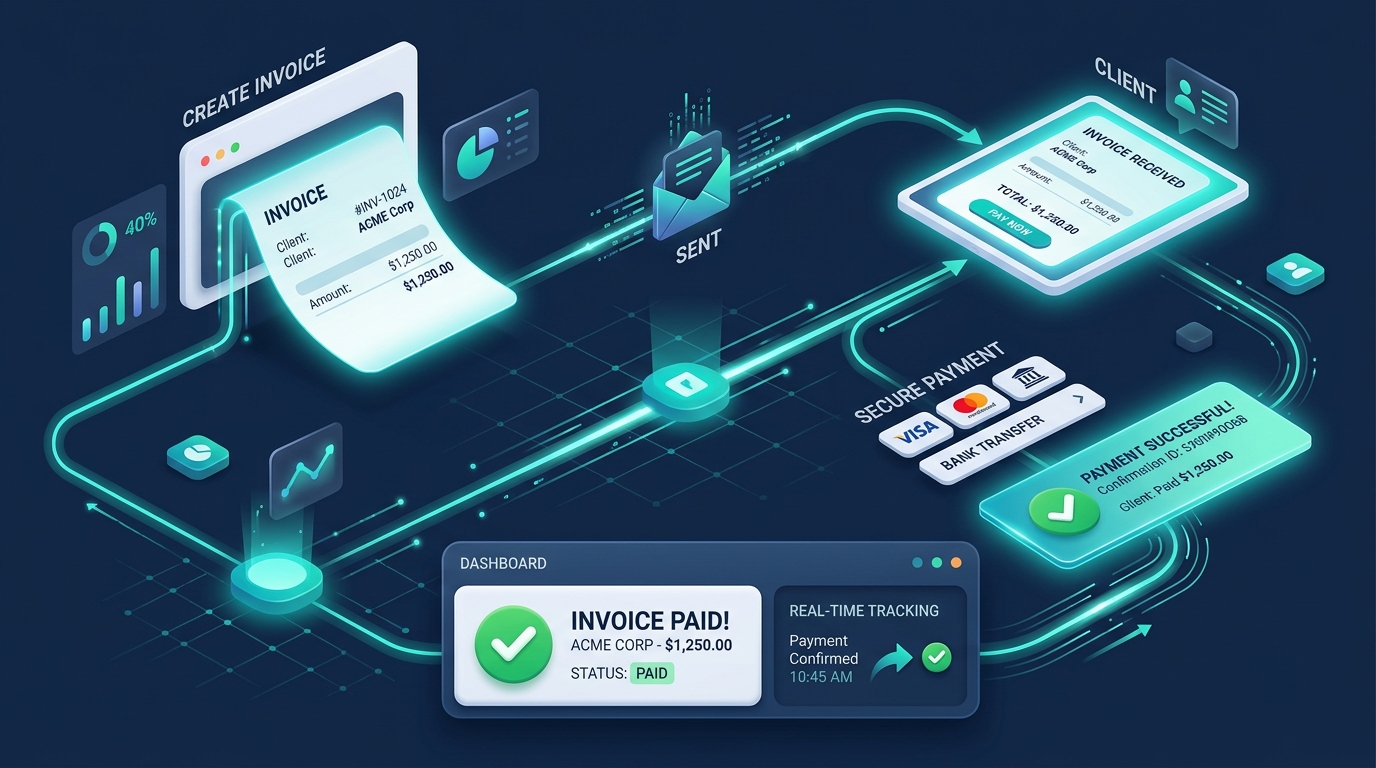
Payment & Invoicing Workflow
From bill creation to multi-channel reminders and real-time bank reconciliation
System Summary
The Problem
You are chasing money you have already earned.
The System
This system sends every invoice, then chases it on its own with polite reminders until the client pays, and lets them pay by card in one click.
Before You Start
- → Add your business details and payment terms to Zoho Invoice before sending any invoices.
- → Connect Stripe as a payment gateway before your first real invoice goes out.
- → Turn on the full reminder schedule (before due, on due, after due) from the start.
Part of the Aheri Sales System
This system is the Convert part of one lead-to-sale method.
See all 9 pipeline stages, the 6 automations and the sales dashboard.
Choose your version
Same system, different tools and budgets. Pick the one that fits your team, and the tools, steps and costs below change with it.
Free version: why this one
This is the right choice for a freelancer or solo owner who wants every invoice chased automatically without paying a cent in monthly software fees.
Chase every overdue invoice automatically, for zero a month.
Tools in this system
The exact tools this build runs on. Each one links to its full review, and where we are an affiliate the link supports our free guides.
How the system works
How the tools connect and hand off to each other, step by step. Follow them in order, and each one links to the tool that does the work.
You send the invoice
Create and send a professional invoice from Zoho Invoice in a couple of minutes, with your payment terms set.
- › Set your default payment terms once under Zoho Invoice's settings (for example Net 14 or Net 30), so every new invoice inherits the right due date without you choosing it each time
- › Add your Stripe pay-now link and bank details to the invoice template itself, not just this one invoice, so the client never has to ask how to pay
- › Send the invoice the same day the work is delivered or the milestone is hit. The reminder schedule below effectively starts counting from your due date, so a delayed send pushes everything back
Reminders chase it automatically
Zoho Invoice emails the client before the due date, on the due date, and after it, on the schedule you set, until they pay. You do nothing.
- › Configure three touchpoints in the reminder schedule: 3 days before due, on the due date, and again at 7 and 14 days overdue
- › Keep the first two reminders polite and factual. Only firm up the wording on the 14-day-late reminder, since sounding aggressive too early damages the relationship without speeding up payment
- › Personalise the reminder template with the client's name and the invoice number so it reads as a real message, not an obvious auto-email
- › Confirm your sending domain is verified so reminders land in the inbox, not spam. An automated reminder nobody sees defeats the entire point
The client pays by card
The invoice carries a pay-now link, so the client pays by card in one click through Stripe, instead of a bank transfer they keep forgetting.
- › Put the pay-now button near the top of the invoice, not buried at the bottom. Most non-payment is friction, not unwillingness
- › List bank transfer details as a backup option for clients who dislike card fees, so you never lose a payment over a payment-method preference
- › Finish Stripe's account verification (adding your payout bank account) before sending your first real invoice. Payouts can be held until that is complete
The invoice marks itself paid
The payment reconciles against the invoice automatically and the reminders stop, so you always know exactly who still owes you.
- › Confirm reconciliation is automatic (no manual 'mark as paid' step) so your unpaid list stays accurate without upkeep
- › Spend five minutes a week scanning the overdue list even though reminders run themselves. Automation catches timing, it does not catch a relationship going wrong
- › If the same client pays late three invoices in a row, that is a pattern, not a coincidence. Move them to a shorter term or an upfront deposit going forward
Before vs After
❌ Before
✅ After
Overdue chasing
You remember to chase, or nobody does
A reminder goes out on schedule automatically
Getting paid
Client waits for a bank transfer they forget to send
Client pays by card in one click from the invoice
Knowing who owes you
You dig through your inbox to work it out
Every invoice shows paid or overdue at a glance
Cost
A paid invoicing tool, or hours of your own time
Zero monthly cost, only a small fee when a card is used
The catch: be aware
The software is free, but card payments carry a processing fee (about 2.9% plus a small fixed amount per payment through the payment gateway), and Zoho Invoice's free plan caps you at around two users with light branding on invoices.
Cost breakdown
Total monthly
Free
Every tool this system runs on and what it actually costs, added up to one real monthly total.
Tool / Service
Plan
Cost
Zoho Invoice
Unlimited invoices and automatic reminders
Free
$0/mo
Stripe
No monthly fee, about 2.9% + 30c per card payment
Pay per payment
$0/mo
TOTAL
No monthly cost, no card required to start
All plans combined
$0/mo
Total
Free
Budget version: why this one
This is the right choice for a small business that has outgrown free tools and wants a professional, branded invoicing setup with light accounting, without paying for a full platform.
Polished invoices, automatic chasing, and real books, for the price of two coffees a week.
Tools in this system
The exact tools this build runs on. Each one links to its full review, and where we are an affiliate the link supports our free guides.
How the system works
How the tools connect and hand off to each other, step by step. Follow them in order, and each one links to the tool that does the work.
You send a branded invoice
Create and send a fully branded invoice from FreshBooks with your logo and payment terms, so it looks like your business, not a free tool.
- › Upload your logo and set your brand colour once in FreshBooks' settings, so every invoice looks consistent without extra work per invoice
- › Set your default payment terms and late-fee policy, if any, at the account level rather than per invoice, so nothing gets forgotten under time pressure
- › Build your services into FreshBooks' items library instead of retyping line items each time. This also keeps your pricing consistent across clients
Reminders chase it automatically
FreshBooks emails the client polite late-payment reminders on the schedule you set, until the invoice is paid, with no action from you.
- › Set the automated reminder schedule: a gentle nudge a few days before due, one on the due date, then escalating reminders at 7 and 14 days overdue
- › Rewrite the default reminder text in your own voice. A small personal touch measurably improves reply rates on the very first nudge
- › Only enable late fees if you will actually apply them consistently. An inconsistently enforced fee reads as an empty threat and costs more trust than having none
The client pays by card
The invoice carries a pay-now link, so the client pays by card in one click through Stripe instead of a slow bank transfer.
- › Connect Stripe as FreshBooks' default online payment method so the pay-now link appears automatically, not something you add per invoice
- › Check the payout schedule and bank account in Stripe are correct before your invoice volume grows, since a payout hold is far more disruptive at higher volume
- › For larger invoices where clients push back on card fees, offer a bank-transfer discount as a second option
It reconciles into your books
The payment marks the invoice paid and lands in your FreshBooks books, so you always know what you are owed and what has come in.
- › Connect your business bank account to FreshBooks so payments and expenses import automatically instead of manual entry
- › Review the unpaid and overdue reports weekly. This is where you spot a client quietly becoming a repeat-late payer before it turns into a bigger cash-flow problem
- › Export a simple profit and loss report monthly, even with an accountant, so you are never surprised by your own numbers
Before vs After
❌ Before
✅ After
Invoice look
Free-tool branding on the document clients read most
Your logo and your look, no third-party branding
Chasing
You remember to follow up, or you do not
Polite reminders go out on schedule automatically
Your books
No real picture of what you are owed
Simple books that show what is paid and outstanding
Cost
Free but limited, or expensive and heavy
About $21 a month for a professional, complete setup
The catch: be aware
The cheapest FreshBooks plan (Lite) limits you to a small number of billable clients, around five. If you invoice more clients than that, you step up to the next plan, which is still modest but not the headline price.
Cost breakdown
Total monthly
$21/mo
Every tool this system runs on and what it actually costs, added up to one real monthly total.
Tool / Service
Plan
Cost
FreshBooks
Branded invoices, automatic reminders, light accounting, ~5 billable clients
Lite
$21/mo
Stripe
No monthly fee, about 2.9% + 30c per card payment
Pay per payment
$0/mo
TOTAL
One low flat monthly cost plus per-payment card fees
All plans combined
$21/mo
Total
$21/mo
Growth version: why this one
This is the right choice for a growing team that wants the deal it closes and the invoice it sends to live in one connected system, with Aheri, a certified Zoho partner, able to build it for you.
The Zoho partner stack that connects the deal you won to the invoice you send.
Tools in this system
The exact tools this build runs on. Each one links to its full review, and where we are an affiliate the link supports our free guides.
How the system works
How the tools connect and hand off to each other, step by step. Follow them in order, and each one links to the tool that does the work.
You close the deal in Bigin
A deal moves through your Zoho Bigin pipeline and you mark it won, with the client and amount already captured.
- › Set up pipeline stages that mirror your real sales process (for example Qualified, Proposal Sent, Won, Invoiced), not a generic template, so Won reliably means ready to invoice
- › Capture the agreed price and payment terms as deal fields while you are closing the deal, not after, since that is exactly the data Zoho Flow needs to build the invoice correctly
- › Assign a clear owner to every deal so accountability for chasing a stalled negotiation does not quietly disappear between people
Flow turns it into an invoice
Zoho Flow sees the won deal and creates a matching invoice in Zoho Books automatically, so no sale is ever left uninvoiced.
- › Build the Flow trigger on the specific pipeline stage change (for example 'Deal moved to Won'), not a vaguer trigger like 'deal updated', so it fires exactly once and never creates duplicate invoices on unrelated edits
- › Map the deal's amount, client, and payment terms fields directly into the new Zoho Books invoice fields inside the Flow builder, so nothing needs retyping
- › Test the flow with one real or sandbox deal before relying on it for actual client invoices, and confirm exactly one invoice is created, not zero and not two
The invoice chases itself
Zoho Books sends the invoice and its automatic reminders until the client pays, and offers a card pay-now link.
- › Configure Zoho Books' reminder schedule the same way as the simpler tiers: before due, on due, then escalating after. The CRM link does not change how reminders should be timed
- › Turn on the client portal so they can see invoice history and pay directly, which cuts down on 'can you resend that invoice' requests
- › Connect Stripe or another payment gateway at the Books account level, not per invoice, so every auto-generated invoice already carries a pay-now link with no manual step
Payment reconciles across the system
The payment marks the invoice paid in Books and the record ties back to the deal in Bigin, so sales and finance always agree.
- › Confirm the payment status syncs back to the original deal record in Bigin, so anyone glancing at a deal can see it is actually paid, not just closed
- › Review the sales-to-invoice funnel monthly: how many won deals became paid invoices, and how long that took on average. This is the actual proof the system is working
- › If deals sit at Won without a matching invoice appearing within a day, that is the Flow trigger misfiring, not a one-off. Check the Flow's execution history for errors
Before vs After
❌ Before
✅ After
Sales to invoice
You re-type won deals into a separate invoicing tool, or forget to
A won deal becomes an invoice automatically
Chasing
Manual, and only when someone remembers
Automatic reminders until the client pays
Sales and finance
Two tools that never agree
One connected system where both always match
Setup
Wiring tools together yourself
Built for you by a certified Zoho partner
The catch: be aware
This is three connected Zoho products rather than one tool, so it takes a proper setup to wire the CRM, the books, and the automation together. That is exactly the kind of build Aheri does as a certified Zoho partner, but it is more involved than a single-tool system.
Cost breakdown
Total monthly
$47/mo
Every tool this system runs on and what it actually costs, added up to one real monthly total.
Tool / Service
Plan
Cost
Zoho Bigin
Sales pipeline CRM, billed yearly ($9 monthly); free plan for a single user
Express
$7/user/mo
Zoho Books
Invoicing, reminders and accounting, per organization, billed yearly ($20 monthly; US edition)
Standard
$15/mo
Zoho Flow
Automation between CRM and Books, 5,000 tasks a month, billed yearly ($29 monthly)
Standard
$25/mo
TOTAL
Billed yearly. Each extra Bigin user adds $7/mo
Combined, 1 user
from $47/mo
Total
$47/mo
Scale version: why this one
This is the right choice for a growing team that needs deep financial reporting and automation strong enough to enforce payment terms, escalate reminders, and apply late fees automatically.
Full accounting, powerful payments, and automation that enforces your payment terms.
Tools in this system
The exact tools this build runs on. Each one links to its full review, and where we are an affiliate the link supports our free guides.
How the system works
How the tools connect and hand off to each other, step by step. Follow them in order, and each one links to the tool that does the work.
You invoice from Xero
Send a branded invoice from Xero with your payment terms, backed by full accounting and reporting behind the scenes.
- › Set up your chart of accounts properly before sending your first invoice. Retrofitting categorisation later is far more painful than a day of setup now
- › Configure default payment terms and a late-fee or interest policy at the organisation level in Xero's invoice settings, so it applies consistently without manual repetition per invoice
- › Connect your real bank feed in Xero so reconciliation is automatic rather than a manual monthly chore
Make escalates the chase
Make runs a sequence that gets firmer over time, from a gentle nudge to a final notice, and applies your late-fee rules automatically.
- › Build the Make scenario with clear escalation tiers: polite at 3 days overdue, firmer at 14 days, a final notice at 30 days, each with distinctly different wording, not the same email repeated
- › Define your late-fee rule explicitly in the scenario (for example 1.5% after 30 days), and only use a rate you are actually prepared to enforce, since inconsistent enforcement is noticed
- › Add a Slack or email alert to yourself, not just the client, when an invoice crosses the final-notice threshold, so a genuinely stuck invoice gets a human phone call, not just another automated email
The client pays globally
Stripe takes card, wallet, or bank payment from anywhere in the world through a pay-now link on the invoice.
- › Enable the specific payment methods your client base actually uses, not just card: bank transfer, wallets, and local payment methods if you invoice internationally
- › Set up multi-currency invoicing in Xero for overseas clients, so the amount they see matches what they expect, which reduces payment delays caused by currency confusion
- › Check your Stripe payout schedule against your own cash-flow needs. Standard payouts can take a few business days, which matters if you are relying on that cash landing by a specific date
It reconciles and reports
The payment reconciles in Xero, the reminders stop, and your reporting shows exactly where cash is, what is overdue, and where the risk sits.
- › Build a simple weekly cash-flow report in Xero, or ask your accountant to: total outstanding, average days overdue, and total overdue by client, so you are managing the number, not just reacting to individual invoices
- › Review which clients consistently trigger the escalation tiers. That is a signal to renegotiate terms with them specifically, for example an upfront deposit, rather than tightening policy for everyone
- › Audit the Make scenario's run history monthly to confirm it is actually firing. An automation that silently stops running is worse than no automation, since you stop manually checking
Before vs After
❌ Before
✅ After
Reporting
No real view of cash flow or what is at risk
Full financial reporting and a live cash-flow picture
Follow-up
One reminder, then silence
An escalating sequence that gets firmer until paid
Payment terms
Late fees you never actually apply
Late fees applied automatically by rule
Payments
Limited or local payment options
Global card, wallet, and bank payments
The catch: be aware
This is the most involved build here. Xero is full accounting software with a subscription to match, and Make automation needs designing to fit your escalation rules. The payoff is control and reporting, but it is a real setup, not a one-hour job.
Cost breakdown
Total monthly
$65/mo
Every tool this system runs on and what it actually costs, added up to one real monthly total.
Tool / Service
Plan
Cost
Xero
Full accounting, invoicing, reminders, reporting
Growing
$40/mo
Stripe
No monthly fee, about 2.9% + 30c per card payment
Pay per payment
$0/mo
Make
Advanced escalation, late fees, and alerts
Core
$10-25/mo
TOTAL
Scales with volume and automation operations
Combined
from $65/mo
Total
$65/mo
All-in-One version: why this one
This is the right choice for a service business that wants one login and one bill for the entire client journey, from the first proposal to the final paid invoice, with nothing to wire together.
One login, one bill, nothing to wire together.
Tools in this system
The exact tools this build runs on. Each one links to its full review, and where we are an affiliate the link supports our free guides.
How the system works
How the tools connect and hand off to each other, step by step. Follow them in order, and each one links to the tool that does the work.
You send a proposal
Send a branded proposal from HoneyBook that includes the contract and the price, so the client can say yes in one place.
- › Build your proposal templates once, with your standard packages, pricing, and terms baked in, rather than starting from a blank proposal every time, so sending one takes minutes
- › Bundle the contract and the price into the same proposal document rather than sending them separately. That is the entire point of an all-in-one: one document, one decision, one signature
- › Set an expiry date on proposals, for example valid for 14 days, to create gentle urgency and stop old, stale proposals sitting in limbo
The client signs and the invoice appears
The client signs the contract and the proposal turns into an invoice automatically, with no re-typing between tools.
- › Confirm in HoneyBook's automation settings that a signed contract automatically generates the matching invoice. This sits on the Essentials plan and above, not Starter, so check your plan before assuming it is live
- › Set the invoice due date and any deposit percentage as part of the template, not manually per client, so the payment schedule is consistent every time
- › Test the full flow yourself with a dummy proposal before sending a real one, so you catch any misconfigured automation before it affects an actual client relationship
Reminders chase it and the client pays
Automatic reminders chase the invoice until it is paid, and the client pays by card through the same platform.
- › Turn on automatic payment reminders, Essentials plan and above, using the same before, on, and after due-date pattern used everywhere else. The underlying principle does not change just because it is bundled into one platform
- › Enable the client portal so they can view and pay every open invoice without asking you to resend anything
- › Watch the card-processing fee, about 2.9% plus 25 cents per payment, in your pricing. On high-ticket invoices, consider a bank-transfer discount to offset it
Everything sits in one place
The proposal, contract, invoice, and payment all live under one client record, so you always know where every project stands.
- › Review each client's full timeline, proposal, contract, invoice, and payments, monthly. This is the actual advantage of an all-in-one: seeing the whole relationship without switching tools
- › Archive completed projects regularly so your active pipeline view stays focused on what actually needs attention
- › If you outgrow HoneyBook's automation limits or need deeper accounting, you can export your client data and move to the Scale-tier best-of-breed stack. You are not locked in
Before vs After
❌ Before
✅ After
Tools
Separate proposal, contract, and invoicing subscriptions
One platform, one login, one bill
Proposal to paid
Re-typing details from one tool into the next
A signed proposal becomes an invoice automatically
Chasing
Manual follow-up when you remember
Automatic reminders until the client pays
Where things live
Spread across apps and inboxes
Everything under one client record
The catch: be aware
An all-in-one charges a monthly subscription plus a card fee per payment, so for very low invoice volume a free single tool is cheaper. You also accept one vendor doing everything reasonably well rather than best-of-breed tools doing each thing perfectly.
Cost: lead pick vs alternatives
What our lead pick costs, and what the honest alternatives cost if a different platform fits you better.
Tool / Service
Plan
Cost
HoneyBook (lead pick)
Whole journey in one place, reminders on Essentials, plus card fees
Starter to Essentials
$36-59/mo
Bonsai (alternative)
Freelancer-focused suite with invoicing and time tracking
Essentials
$25/user/mo
Zoho One (alternative)
45+ apps if you want far more than getting paid
All employee
$37/employee/mo
Dubsado (alternative)
Client management with invoicing and workflows
Starter
$35/mo
AI Agent version: why this one
This is the right choice for an owner who wants invoice follow-up that sounds like they wrote it and adapts to each client, at a volume hand-writing cannot reach, and who is happy to supervise an AI agent at first.
An AI agent writes and sends a personal follow-up for every late client, and only pulls you in when it matters.
Tools in this system
The exact tools this build runs on. Each one links to its full review, and where we are an affiliate the link supports our free guides.
How the system works
How the tools connect and hand off to each other, step by step. Follow them in order, and each one links to the tool that does the work.
The invoice goes out
You send the invoice from Zoho Invoice as normal, with a Stripe pay-now link and your payment terms set.
- › Send the invoice exactly as in the Free-tier setup. The agent works on top of this, it does not replace the invoicing tool itself
- › Set due dates accurately and consistently, since the agent's entire trigger logic depends on knowing exactly when an invoice becomes overdue
- › Keep client contact details, name and how you normally address them, accurate and current in Zoho Invoice, since the agent uses this to personalise its messages
The AI agent spots it going overdue
Lindy watches your invoices and, when one passes its due date, reads the client and history to prepare a follow-up.
- › Connect Lindy to your invoicing tool and inbox during setup, and test the connection against one real overdue invoice before trusting it with your full list
- › Give the agent a few examples of your own tone from past reminder emails you have actually sent, so its first drafts sound like you, not a generic template
- › Set the trigger window explicitly, for example checks daily and flags anything one or more days overdue, so nothing sits unnoticed for a week before the agent even starts
It writes and sends a personal chase
The agent writes a reminder in your voice, tailored to that client, sends it, and escalates the tone across a sequence if it stays unpaid, handing off to you if the client replies needing a real answer.
- › Start in review-before-send mode: the agent drafts every message, you approve before it sends, for at least the first two to three weeks
- › Define the escalation ladder yourself, tone at day 3, day 14, and day 30, rather than letting the agent freestyle it, so you control exactly how firm it gets and when
- › Set an explicit hand-off rule: if the client replies with a question, a dispute, or a payment-plan request, the agent stops and flags you immediately instead of continuing to send automated messages into an active conversation
The client pays and the agent stops
The client pays by card through Stripe, the invoice marks itself paid, and the agent stops chasing, so no one gets a reminder after they have paid.
- › Confirm the agent checks payment status before sending each scheduled follow-up, so a client who already paid never receives an awkward reminder afterward
- › Review a sample of the agent's sent messages weekly, even once you trust it, since tone can drift as it handles more edge cases
- › Once comfortable, consider extending the same agent to a second use case, such as lead follow-up or onboarding check-ins, since the trust and review habit built here transfers directly
Before vs After
❌ Before
✅ After
Follow-up tone
A generic template clients tune out
A personal message in your voice, tailored to each client
Scale
You can only hand-write a few chases
Every late client gets a considered follow-up
Escalation
One reminder, then silence
The agent gets firmer over time until paid
Your involvement
You chase everything yourself
You step in only when a client genuinely needs you
The catch: be aware
Lindy is credit-based, so a busy agent can cost more than the entry plan, and an AI agent that sends on your behalf needs supervising until you trust it. Run it in review-before-send mode for the first few weeks, not fully hands-off from day one.
Cost breakdown
Total monthly
$50/mo
Every tool this system runs on and what it actually costs, added up to one real monthly total.
Tool / Service
Plan
Cost
Lindy
Credit-based AI agent, more usage consumes credits faster
Plus
$49.99/mo
Zoho Invoice
Unlimited invoicing and due-date tracking
Free
$0/mo
Stripe
No monthly fee, about 2.9% + 30c per card payment
Pay per payment
$0/mo
TOTAL
Mostly the Lindy plan, plus per-payment card fees
Combined
from $50/mo
Total
$50/mo
Implementation Support
Need help getting this system running?
This system is built to be set up without a consultant, and every step is on this page. If you want a hand, we can help you put it in place and walk your team through it.
Get this system as a PDF
A portable one-pager version of everything on this page: the tools, the steps, the costs. Downloads immediately, no waiting on an email.
Our guarantee
The worst case is you spend an hour setting it up and it costs you nothing, because both tools are free to start with no card required.
Common Mistakes
Not turning on the full reminder schedule (before, on, and after due date).
Turn on all three reminder stages in Zoho Invoice, not just the overdue one, so the client gets a heads-up before the due date too.
Skipping the Stripe test payment.
Send yourself a test invoice and actually pay it by card before relying on the pay-now link with real clients.
Assuming free means feature-limited.
Check Zoho Invoice's free plan covers your actual invoice volume and user count (2 users) before assuming you will need to upgrade.
Frequently asked questions
References
- Zoho Invoice (official site) . Zoho
- Stripe (official site) . Stripe
- 2025 US Small Business Late Payments Report (2025) . QuickBooks (Intuit)
- Late Invoice Statistics 2026 (2026) . Clockify
Add us to your preferred sources to see our latest business systems, tool reviews, and RevOps guides first in your Google feed.
Build once. Run repeatedly.
The system is here. Put it to work.
Every step is published and the tools are free to try. Build it yourself, or get implementation support if you want a hand.