Never Lose a Lead: The Speed-to-Lead System
Reply to every new lead in minutes, so no enquiry goes cold while you are busy.
Setup time
1.5 to 4.5 hours
Faster if experienced, longer if new to the tools
Monthly cost
Free to $90/mo
Software only, plus any card fees
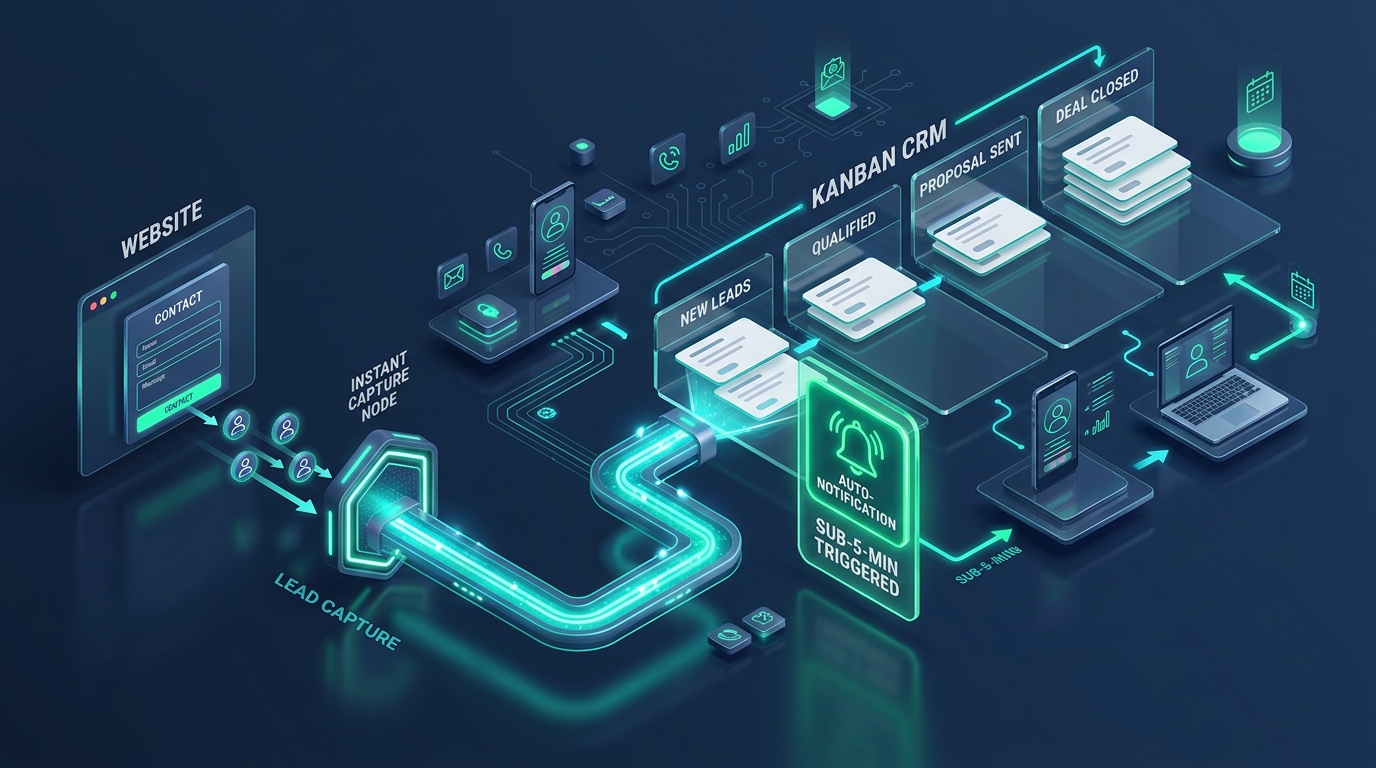
Lead Capture & CRM Routing Flow
Instant form intake, automated CRM qualification pipeline, and sub-5-minute alert triggers
System Summary
The Problem
Over 60% of small business inquiries go completely unanswered. Inquiries sit in personal email accounts while you handle day-to-day operations, giving prospects plenty of time to contact competitors who reply first.
The System
A simple, reliable speed-to-lead workflow built on Zoho Bigin Free. Every web form submission triggers an instant email confirmation to the prospect, sends an immediate mobile alert to the owner, and schedules a 60-minute task to complete a personal phone call.
Before You Start
- → Sign up for a free Zoho Bigin account
- → Access your website editor to place the native form code
- → Download the Zoho Bigin app on your smartphone
Part of the Aheri Sales System
This system is the Follow Up part of one lead-to-sale method.
See all 9 pipeline stages, the 6 automations and the sales dashboard.
Choose your version
Same system, different tools and budgets. Pick the one that fits your team, and the tools, steps and costs below change with it.
Free version: why this one
It costs nothing to run, takes under an afternoon to set up, and ensures every single prospective client gets a professional reply in under 60 seconds.
Catch Every Inbound Form and Reply in Minutes on Zero Software Budget
Tools in this system
The exact tools this build runs on. Each one links to its full review, and where we are an affiliate the link supports our free guides.
How the system works
How the tools connect and hand off to each other, step by step. Follow them in order, and each one links to the tool that does the work.
Prospect fills out your web form
A prospective client completes the native Bigin web form on your website with their name, email, phone number, and project notes.
- › Embed the Bigin web form directly on your contact page without third-party form plugins
- › Set mandatory fields for email, phone number, and required service to filter out low-intent form spam
- › Map incoming form submissions straight into the New Lead stage of your Inbound Leads pipeline
Sub-60-second automated confirmation goes out
Bigin workflow rule 1 sends an immediate branded email confirmation to the prospect with next steps.
- › Create a plain, friendly email template thanking the prospect and confirming their inquiry was received
- › Explain the clear next step: state that your team reviews notes and calls within 1 business hour
- › Provide a direct link to your booking calendar or phone number if their request is urgent
Owner receives instant mobile push alert
Bigin workflow rule 2 pings your phone via the Bigin mobile app with full lead details.
- › Install the Bigin mobile app on your phone and enable high-priority push notifications
- › Trigger an immediate mobile notification the second a new lead record is created
- › View the prospect phone number, service interest, and notes directly from your phone lock screen
60-minute task is scheduled on the lead record
Bigin workflow rule 3 creates a high-priority call task due in exactly 1 hour so the lead is never forgotten.
- › Configure workflow rule 3 to auto-generate a Call Lead task with high priority
- › Set the task due date to Created Time plus 1 hour to enforce your response standard
- › Call the prospect, mark the task complete, and move the deal from New Lead to Contacted
How much time and money could this system save you?
This is a worked example, not a promise. Every business is different, so change the numbers below to match yours.
Copying website enquiries from your inbox into your lead list
10 a week. By hand 4 min each, with this system it happens automatically.
40 min back each week
Checking your inbox for new enquiries
15 a week. By hand 2 min each, with this system it happens automatically.
30 min back each week
Setting yourself a reminder to call each new lead
10 a week. By hand 2 min each, with this system it happens automatically.
20 min back each week
| Task | How often | By hand | With this system | Time back each week |
|---|---|---|---|---|
| Copying website enquiries from your inbox into your lead list | 10 a week | 4 min each | Automatic | 40 min |
| Checking your inbox for new enquiries | 15 a week | 2 min each | Automatic | 30 min |
| Setting yourself a reminder to call each new lead | 10 a week | 2 min each | Automatic | 20 min |
In this example: about 1.5 hours back each week.
Each week
-
Each month
-
Each year
-
How we worked this out: minutes per task are our estimate of doing the job by hand versus with this system, based on the official product documentation. They are not measured results. A month here is 52 weeks divided by 12.
The catch: be aware
Bigin Free is limited to 1 user, 500 total records, and 3 workflow automations. It does not include WhatsApp messaging or automated escalation rules. If you do not answer the task yourself, the lead can still go cold.
Budget version: why this one
For only $7 per user per month, it removes the Free plan limits, unlocks WhatsApp communication, and adds an automated safety net that prevents deals from going cold.
Add WhatsApp Auto-Replies, Appointment Booking, and 1-Hour Escalation for $7/mo
Tools in this system
The exact tools this build runs on. Each one links to its full review, and where we are an affiliate the link supports our free guides.
How the system works
How the tools connect and hand off to each other, step by step. Follow them in order, and each one links to the tool that does the work.
Lead enters through web form or WhatsApp
Prospect reaches out via your website form or sends an inbound WhatsApp message to your business number.
- › Capture web inquiries and WhatsApp chats into one unified Bigin contact record
- › Auto-tag the lead source as Website or WhatsApp for accurate tracking
- › Assign the lead to an active team member using standard assignment rules
Instant dual-channel confirmation with booking link
Bigin fires an immediate reply across email or WhatsApp providing a direct calendar booking link.
- › Send an instant confirmation email or pre-approved WhatsApp template message
- › Include your Bigin Booking Page link so qualified leads can pick a call slot immediately
- › Chili Piper benchmarks show instant booking converts up to 66.7% of qualified leads into held meetings
Rep receives priority mobile notification
The assigned rep receives an urgent notification on mobile and desktop with the prospect phone and details.
- › Push alert lands on the assigned team member phone within 10 seconds
- › An urgent task is added to their daily task queue: Contact new lead within 60 minutes
- › Rep reviews prospect project details and initiates direct contact
Automated 60-minute escalation rule checks status
A scheduled workflow runs 60 minutes after lead creation to verify whether a human response has taken place.
- › Workflow checks if lead status is still New Inquiry with zero logged calls or emails
- › If untouched, Bigin automatically updates lead priority to Urgent: Overdue
- › An escalation email and push alert trigger immediately to the business owner or backup manager
End-of-day zero-waiting review
Owner checks the Uncontacted Leads saved view before closing business to ensure zero leads sit overnight.
- › Open the pre-configured Bigin view: Leads Created Today with No Outreach Activity
- › Reassign any stalled inquiries or make a quick outbound call before evening
- › Ensure the pipeline starts clean every morning with zero backlog
The catch: be aware
Bigin Express includes 30 automations and 1 booking page, but does not offer round-robin lead assignment across multiple reps or custom Deluge coding for complex routing.
Growth version: why this one
It delivers structured, enterprise-grade lead distribution and sub-pipeline tracking on a simple CRM interface that non-technical teams actually enjoy using.
Route Inquiries by Service, Assign Team Calendars, and Enforce Strict Response SLAs
Tools in this system
The exact tools this build runs on. Each one links to its full review, and where we are an affiliate the link supports our free guides.
How the system works
How the tools connect and hand off to each other, step by step. Follow them in order, and each one links to the tool that does the work.
Inbound inquiry captured with service segmentation
Prospective client completes a smart intake form or WhatsApp flow specifying their exact service requirement.
- › Form captures specific requirements: service category, budget range, and timeline
- › Bigin custom fields automatically categorize the deal value and priority tier
- › Record enters the Inbound Intake sub-pipeline for immediate qualification
Intelligent routing assigns the right specialist
Bigin assignment rules evaluate service category and rep availability to route the lead to the best specialist.
- › Route technical inquiries to specialist engineers and general requests to sales representatives
- › Use round-robin assignment within rep groups to balance lead volume evenly
- › Lead owner receives an instant mobile alert with complete qualification notes
Specialist-specific booking calendar dispatched in under 60 seconds
Prospect receives a personalized confirmation containing the assigned specialist direct booking calendar.
- › Dynamic email and WhatsApp confirmation embeds the assigned rep calendar link
- › Prospect can self-select an open time slot directly on the specialist calendar
- › Booked meetings automatically update the Bigin deal stage to Discovery Call Scheduled
Automated 45-minute response SLA timer monitors activity
System checks rep activity at 45 minutes and escalates if no contact attempt has been logged.
- › Bigin monitors deal activity: phone calls, manual emails, or meeting bookings
- › If uncontacted at 45 minutes, a reminder alert triggers to the rep and team lead
- › At 60 minutes, the deal automatically reassigns to an on-duty backup representative
Seamless transition to Technical Qualification pipeline
Once initial contact is made, the deal moves automatically into the connected closing sub-pipeline.
- › Rep marks initial outreach complete with call notes and qualification status
- › Bigin sub-pipeline automation moves the deal to Technical Qualification without re-entering data
- › Next steps and proposal drafting tasks populate automatically for the account manager
The catch: be aware
Bigin 360 handles team routing and sub-pipelines cleanly, but it remains CRM-focused. It does not include live website visitor chat or cloud phone infrastructure.
All-in-One version: why this one
Eliminates disconnected software tools. A missed phone call triggers an instant SMS auto-reply, a website visitor is engaged before leaving, and managers track median response times in real time.
Catch Website Chat, Phone Calls, and Inquiries in One Unified Platform with Zoho One
Tools in this system
The exact tools this build runs on. Each one links to its full review, and where we are an affiliate the link supports our free guides.
How the system works
How the tools connect and hand off to each other, step by step. Follow them in order, and each one links to the tool that does the work.
Website visitor engaged proactively via Zoho SalesIQ
Zoho SalesIQ detects high-intent visitors on pricing or service pages and opens a helpful conversation before they leave.
- › SalesIQ chatbot engages visitors spending over 45 seconds on high-intent service pages
- › Bot captures visitor name, email, phone number, and primary service requirement
- › Record syncs into Zoho CRM instantly as a qualified inbound lead
Missed phone calls trigger instant SMS auto-reply via Zoho Voice
When an inbound caller cannot be reached, Zoho Voice automatically sends an instant SMS with a booking link.
- › Zoho Voice detects an unanswered inbound call during or outside business hours
- › System fires an automated SMS: Sorry we missed your call. How can we help? You can book a direct call slot here
- › Call log and recording are linked directly to the caller contact profile in the CRM
Multi-channel lead ingestion into unified CRM pipeline
All chat conversations, missed calls, and web form submissions land in one unified New Leads pipeline.
- › Automated deduplication checks existing phone numbers and emails to prevent split records
- › Lead scoring model assigns points based on channel intent and page visit history
- › Round-robin distribution hands the lead to the on-duty sales representative
Browser softphone click-to-dial for sub-3-minute outreach
Reps use Zoho Voice integrated click-to-dial directly inside the CRM to call prospects in seconds.
- › Rep clicks the phone number inside the CRM record to place an instant outbound call
- › Call recording and duration automatically log against the deal record
- › If the prospect answers, the rep conducts the discovery call and advances the stage
Automated 30-minute escalation and manager notification
If a hot chat or missed-call lead sits uncalled for 30 minutes, an automated escalation pings the sales director.
- › Workflow rule triggers when high-intent leads remain untouched at 30 minutes
- › Escalation alert sends an urgent Slack or Cliq notification to the sales manager
- › Lead is automatically reassigned to an available backup representative
Zoho Analytics tracks real-time team response SLAs
Managers monitor First Response Time (FRT), median time to call, and conversion rates across all channels.
- › Dashboard displays live First Response Time by representative, team, and lead source
- › Weekly reports identify response bottlenecks and qualification drop-offs
- › Management reviews response metrics in weekly sales operations meetings
The catch: be aware
Zoho One requires a higher per-user investment ($90/user/mo flexible) and structured setup. It is only cost-effective when your business actively runs 5 or more apps in the Zoho One suite.
AI Agent version: why this one
Combines the speed of an instant auto-responder with the high conversion rate of a thoughtful, bespoke personal reply.
Let AI Parse Inquiry Notes, Score Buying Intent, and Draft Tailored First Responses
Tools in this system
The exact tools this build runs on. Each one links to its full review, and where we are an affiliate the link supports our free guides.
How the system works
How the tools connect and hand off to each other, step by step. Follow them in order, and each one links to the tool that does the work.
Prospect submits detailed inquiry or project brief
Prospective client completes your contact form providing a detailed description of their problem and requirements.
- › Inquiry lands in Bigin with raw message text and project background
- › Zia or connected AI parser reads the message body within 5 seconds of submission
- › AI extracts structured fields: primary need, estimated timeline, mentioned budget, and buying urgency
AI generates pre-call executive summary
System compiles a 3-bullet briefing on the lead record so the rep grasps the deal context at a glance.
- › Zia summarizes the client problem, stated requirements, and recommended initial service offering
- › Deal receives an Intent Score (High, Medium, Low) based on budget mentions and urgency words
- › Summary posts directly into the lead record notes feed
AI drafts contextualized personal reply
AI drafts an individualized email addressing the prospect specific problem and referencing matching past work.
- › AI drafts a friendly, professional response speaking directly to the prospect points
- › The draft embeds the rep personal booking calendar link for a targeted discovery call
- › Draft is saved in the Bigin email composer attached to the lead record
Rep reviews draft in 15 seconds and clicks send
Rep opens the pre-drafted email, makes any quick personal tweaks, and dispatches the message.
- › Rep receives mobile push alert: AI response draft ready for review
- › Rep spends 15 to 30 seconds reading and approving the personalized text
- › Message sends from the rep actual business email account, looking completely personal
Automated 2-day reminder timer engages if no booking occurs
If the prospect does not book a call within 48 hours, a gentle follow-up task is scheduled automatically.
- › Workflow monitors booking calendar for confirmed appointment
- › If no appointment is booked within 48 hours, a follow-up nudge task triggers for the rep
- › Rep sends a brief check-in to keep the conversation moving forward
The catch: be aware
Zia monthly credits are capped (1,000 on Premier, 3,000 on 360). AI drafts the message, but a human must review and confirm before committing custom pricing or project deliverables.
Implementation Support
Need help getting this system running?
This system is built to be set up without a consultant, and every step is on this page. If you want a hand, we can help you put it in place and walk your team through it.
Get this system as a PDF
A portable one-pager version of everything on this page: the tools, the steps, the costs. Downloads immediately, no waiting on an email.
Common Mistakes
Sending a generic no-reply confirmation email that fails to tell the customer when you will actually contact them
Forgetting to install the Bigin mobile app, causing you to miss inquiries until you check desktop email hours later
Using up your 3 free automation rules on non-essential tasks rather than the core speed-to-lead sequence
References
Add us to your preferred sources to see our latest business systems, tool reviews, and RevOps guides first in your Google feed.
Build once. Run repeatedly.
The system is here. Put it to work.
Every step is published and the tools are free to try. Build it yourself, or get implementation support if you want a hand.